Guide · 7 November 2026
How to free up iPhone storage from photos without losing what matters
Photos and videos are usually the biggest thing on an iPhone. Getting space back doesn't mean deleting memories. Most of the weight is old screenshots, copies, a few long videos, and things you already deleted that are still waiting to go.
Step 1: See how much space Photos is using
Start by looking at the numbers, so you know whether photos are really the problem.
- Open Settings.
- Tap General, then iPhone Storage.
- Wait a moment for the bar at the top to fill in.
- Find Photos in the list of apps. The number next to it is how much your library takes on this iPhone.
Above the list, your iPhone may show recommendations, such as reviewing large videos or emptying Recently Deleted. They are worth a look, since they point at the biggest wins on your phone.
Step 2: Clear out old screenshots
Each screenshot is small, but most people have far more than they think. A few thousand screenshots add up, and nearly all of them were only useful for a day.
- Open Photos and go to the collections. On iOS 26 that's the Collections tab. On iOS 18, scroll down below the grid.
- Under Media Types, tap Screenshots.
- Tap Select, drag your finger across the thumbnails to select many at once, and tap the trash button.
Good candidates: sign-in codes, boarding passes for trips you already took, delivery updates, ride receipts, and memes you already sent. If a screenshot holds something you need, like a booking reference, open it, use Live Text to copy the text somewhere useful, and then delete it. We wrote a longer guide on organizing screenshots on iPhone if you want to keep some in order.
Step 3: Merge duplicates
Copies of the same photo come from chat apps, imports and saved images. Photos can find them for you.
- In Photos, go to the collections and find Utilities.
- Tap Duplicates.
- Review the sets and tap Merge, or tap Select to merge many sets at once.
Photos keeps the highest quality version and moves the extras to Recently Deleted. It won't touch lookalike shots that are different photos, like ten takes of the same sunset. Our guide on deleting duplicate photos on iPhone explains how to handle those.
Step 4: Look at your largest videos
Video is where space really goes. A single minute of 4K video can take hundreds of megabytes, so a few long clips can outweigh thousands of photos.
- In Photos, open Media Types and tap Videos.
- Look at the length shown on each thumbnail. Long clips are usually the largest.
- Delete the ones you don't need, like accidental recordings or a whole concert you never watched again.
For a long video where you only want a part, trimming in the editor keeps the original so you can undo the change, which means it may not save space. Instead, trim it and choose to save it as a new clip, then delete the original.
Going forward, you can choose a lighter setting in Settings, Camera, Record Video. That screen shows roughly how much space a minute of video takes at each option.
Step 5: Empty Recently Deleted
This is the step most people miss. When you delete a photo or video, it isn't gone yet. It moves to Recently Deleted, stays there for 30 days, and keeps using space the whole time. If you just cleared a few gigabytes, they won't come back until this folder is empty.
- In Photos, go to Utilities and tap Recently Deleted.
- Unlock it with Face ID, Touch ID or your passcode.
- Tap Select, then choose to delete all.
- Confirm.
This one is permanent. Once you empty Recently Deleted, those photos can't be recovered from your iPhone. Scroll through it once before you confirm.
Step 6: Let iCloud keep the full-size originals
If you use iCloud Photos, your iPhone can keep smaller versions of your photos and leave the full-size originals in iCloud. It downloads the original when you open or share a photo.
- Open Settings and tap your name at the top.
- Tap iCloud, then Photos.
- Make sure syncing is on. On recent versions this switch is called Sync this iPhone.
- Choose Optimize iPhone Storage.
Your iPhone swaps in the smaller versions gradually, mostly when it starts running low on space, so don't expect the number to drop the same minute. You need enough iCloud storage for your whole library, and the free plan is 5 GB. Also keep in mind that with iCloud Photos on, deleting a photo on your iPhone deletes it everywhere.
A faster way for screenshots and lookalikes
Steps 2 and 3 are the slow ones if you do them by hand. Sorta, a free iPhone app we make, does both on your phone. Its Safe to delete card gathers screenshots that have done their job: old one-time sign-in codes, boarding passes and tickets whose date has passed, delivered parcels and finished rides. Its Doubles tab finds exact copies and lookalikes taken seconds apart, keeps the best shot of each set and your favorites, and lines up the rest.
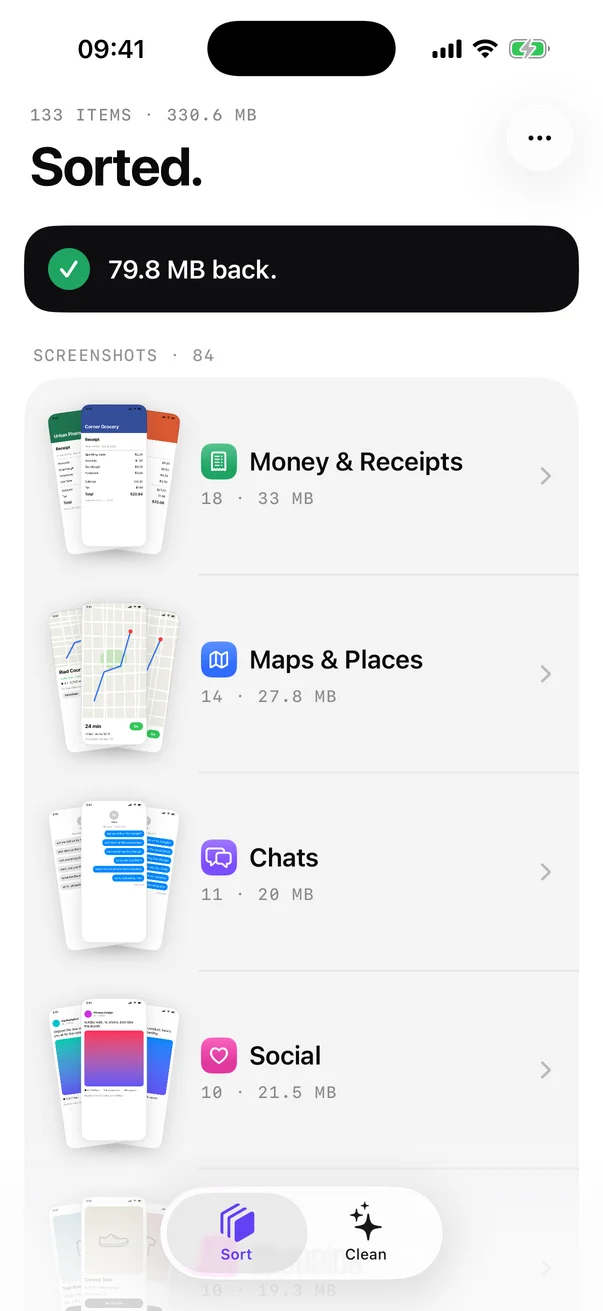
Everything is read on the device. Nothing is uploaded and there is no account. Deleting uses the normal iOS confirmation, and items go to Recently Deleted for 30 days, so Step 5 still applies when you want the space right away.
What to keep
Freeing space is easier when you are clear about what you won't touch:
- Photos of people, especially ones you can't take again.
- Your favorites.
- Documents you might need, like warranties, contracts or medical papers. Keep those in an album so they are easy to find.
- Anything you aren't sure about. Space is easier to buy than a lost photo.
FAQ
I deleted photos, so why didn't my iPhone storage go up?
Deleted photos and videos stay in Recently Deleted for 30 days and still use space. Empty it from the Utilities section of Photos to get the space back now.
Does Optimize iPhone Storage lower the quality of my photos?
No. Your full-resolution originals stay in iCloud. The iPhone keeps smaller versions when space is tight and downloads the original when you open or share a photo, so you need a connection to see full quality.
If I delete photos on my iPhone, are they deleted from iCloud?
If iCloud Photos is on, yes. Deleting on one device deletes on every device signed in with the same Apple Account. It stays recoverable in Recently Deleted for 30 days.
Is it safe to delete old screenshots?
Most of them, yes. Sign-in codes, old tickets and delivery updates are rarely needed again. Copy out any text you want to keep with Live Text first.